
If you’re new to building websites, the term “web hosting” might sound technical—but it’s actually quite simple.
Web hosting is the service that makes your website available on the internet. Every website you visit is stored somewhere, and that “somewhere” is a server. A hosting company provides space on these servers so your website can be seen by others.
Think of it like this: if your website is a shop, then web hosting is the land where your shop is built. Without that space, your website simply can’t exist online.

In 2026, web hosting has become much easier for beginners. Most hosting providers offer simple dashboards, one-click installs, and automatic setup. You don’t need to be a developer to get started anymore.
But not all hosting is the same. The quality of your hosting affects how fast your website loads, how often it stays online, and how secure it is.
So while it may seem like a small decision, choosing the right web hosting can make a big difference in your website’s success.
How does web hosting actually work?
Behind the scenes, web hosting works in a pretty straightforward way.
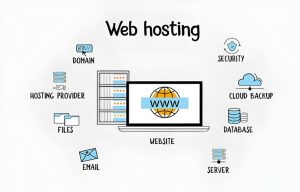
When someone types your website name into their browser, the internet needs to find where your site is stored. This is done through something called DNS (Domain Name System), which connects your domain name to a server.
Once the correct server is found, it sends your website files—like text, images, and code—to the visitor’s browser. The browser then puts everything together and displays your site.
All of this happens in just a few seconds.
Modern hosting providers also use extra tools to make things faster and more reliable. For example, caching helps load pages quickly, and CDNs deliver content from servers closer to the visitor.
Security is also part of the process. Good hosting companies protect your site with firewalls, SSL certificates, and regular updates.
In simple words, web hosting is what connects your website to the world.
What types of web hosting are there?
There isn’t just one type of web hosting. In fact, there are several options, and each one is designed for different needs.
The most common types include shared hosting, VPS hosting, dedicated hosting, cloud hosting, and reseller hosting.
If you’re just starting out, shared hosting is usually the easiest and cheapest option. As your website grows, you might need something more powerful like VPS or cloud hosting.
Each type has its own pros and cons. Some are budget-friendly but limited, while others offer more control and performance but cost more.
Understanding these options helps you make a smarter choice based on your goals.
Shared web hosting
Shared hosting is where multiple websites use the same server.
- Low-cost and easy to set up
- No server management required
- Hosting provider handles maintenance and security
- Limited resources and slower performance during peak traffic
- Minimal control or customization
- Not ideal for scaling or heavy workloads
- Best for personal websites, blogs, and small business sites
It’s the most affordable option and perfect for beginners. You don’t need technical skills, and everything is managed for you.
However, since resources are shared, your site can slow down if other websites use too much power.
Still, for blogs, portfolios, and small business sites, shared hosting is a great starting point.
VPS hosting
VPS hosting is like having your own portion of a server.
- Isolated resources ensure consistent performance and reliability
- Root access allows deeper configuration and software control
- Improved speed and stability compared to shared environments
- Requires some technical know-how to manage and secure
- Best for growing websites or businesses needing more flexibility
You still share a physical server, but your resources are separate. This means better performance and more control.
It’s a good option if your website is growing and needs more stability.
Dedicated hosting
With dedicated hosting, you get an entire server just for your website.
- Full access to all server resources, no sharing with others
- Maximum performance and configuration flexibility
- Highest cost compared to other hosting types
- Requires strong technical or system administration skills
- Best for high-traffic sites, enterprise workloads, or compliance-sensitive projects
This gives you full control, top performance, and strong security. But it’s also more expensive and usually requires technical knowledge.
It’s best for large websites or businesses with heavy traffic.
Cloud hosting
Cloud hosting uses a network of connected servers to distribute resources and handle demand dynamically, ensuring strong uptime and flexible scaling.
- Distributed infrastructure improves reliability and redundancy
- Elastic scaling handles variable or unpredictable traffic
- Excellent performance for modern web apps and growing businesses
- May cost more as usage increases
- Can require more setup or technical management than shared plans
Cloud hosting uses multiple servers instead of just one.
This makes it very reliable because if one server fails, another takes over.
It’s also flexible—you can increase or decrease resources based on your needs.
Reseller hosting
Reseller hosting lets you sell hosting services to others.
- Create and sell hosting plans to clients
- Includes WHM or control panel access for easy management
- Custom branding and pricing for your own packages
- Profit margin depends on how you structure and sell plans
It’s often used by freelancers or agencies who want to offer hosting to their clients.
You don’t manage servers yourself—the main hosting provider handles that part.
Types of hosting summary
To keep it simple:
- Shared hosting is best for beginners
- VPS is for growing websites
- Dedication is for high performance
- The cloud is for flexibility
- Resellers are for business purposes
Your choice depends on your budget and your website’s needs.
How do I choose the right web host?
Choosing a web host doesn’t have to be complicated.
Start by thinking about what you need. Is it a simple blog or a business website? How much traffic do you expect?
Look for a host that offers good uptime, fast speed, and reliable support. These are the basics.
Also see if they offer features like backups, SSL certificates, and easy setup.
Don’t just go for the cheapest option—go for value.
A good host will save you time, stress, and problems later.
What’s the real trade-off between free and paid hosting?
Free hosting sounds attractive, but it comes with limitations.
You might see ads on your site, experience slow speeds, or have limited control.
Paid hosting, on the other hand, gives you better performance, more features, and full ownership of your website.
If you’re serious about your website, paid hosting is usually the better choice.
Reliability
Paid hosting is much more reliable. Your site stays online most of the time.
Free hosting can go down more often, which can frustrate visitors.
Traffic/bandwidth
Free plans limit how many visitors your site can handle.
Paid hosting allows more traffic and smoother performance.
Security measures
Paid hosting includes important security features.
Free hosting usually doesn’t offer strong protection.
Customer support
With paid hosting, you can get help anytime.
Choose a host that offers 24/7/365 technical support with knowledgeable staff. Check reviews for response quality and available contact channels. A solid knowledge base or FAQs can also help you troubleshoot on your own.
- PHP/MySQL versions – ensure current versions are supported for compatibility and performance.
- SSH/SFTP access – securely connect to your server for advanced file or database management.
- .htaccess configuration—customize redirects, error pages, and security rules.
- Backups, restore, and staging—protect data and safely test updates before going live.
- CDN integration – improve speed and reliability by serving content from global servers.
- Email hosting or add-ons—set up professional addresses or connect to your email product.
Free hosting often leaves you on your own.
Cost
Hosting prices vary widely. Shared hosting plans can start at just $17 per year, while higher-capacity plans rise with resource demands.
Tip: Start with a monthly plan to test performance and support, then switch to annual billing for savings once satisfied.
Frequently asked questions:
What is web hosting in simple terms?
Web hosting is a service that stores your website files on a server and makes them accessible on the internet. In simple words, it is like renting space online where your website lives so people can visit it anytime.
Which hosting is best for beginners?
For beginners, shared hosting is the best option. It is affordable, easy to manage, and does not require technical knowledge. It is ideal for small websites, blogs, and starter business sites.
Is VPS better than shared hosting?
Yes, VPS hosting is better than shared hosting in terms of performance and control. VPS gives you dedicated resources and better speed, while shared hosting is more budget-friendly but less powerful.
Do I need cloud hosting?
Cloud hosting is useful if you want high uptime, scalability, and better performance during traffic spikes. If your website is small, you may not need it at the start, but it is a good option for growing businesses.
How much does web hosting cost per year?
Web hosting usually costs between $20 to $300+ per year, depending on the type of hosting. Shared hosting is cheaper, while VPS, cloud, and dedicated hosting are more expensive.
Does hosting affect SEO and speed?
Yes, hosting directly affects website speed, uptime, and SEO ranking. A fast and reliable hosting provider improves user experience and helps your website rank better on Google.
Can I switch hosts later?
Yes, you can easily switch hosting providers later. Most companies offer free or paid migration services to move your website without losing data.
What is uptime, and why does 99.9% matter?
Uptime is the time your website stays online without going down. 99.9% uptime means your website is almost always available, which is important for trust, SEO, and user experience.